
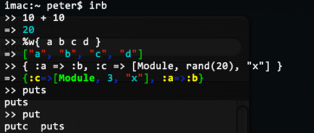
If you haven't got tab-completion and syntax coloring in your irb, you owe it to yourself to follow these instructions right away (should work for Linux, OS X, and Cygwin users). First, install the Wirble gem:
sudo gem install -y wirble
Next, create or edit a file called .irbrc in your home folder (~/.irbrc), and make sure these lines are included there:
require 'rubygems'
require 'wirble'
Wirble.init
Wirble.colorize
Now play with irb and see joy similar to that in the screenshot above. Try tab-completion too. It's great!
Comments
matt ·
Awesome!
ariekeren ·
nice. however it doesn't colorize pp
John Athayde ·
Nice tip! I'm rolling with it on my system now. A bit difficult to read some of the darker colors on an inverted shell (white on black), especially when you add transparency to it, but I'll manage to deal :)
Matt Baron ·
Anyone know if its possible to control the way it colors the syntax?
Matt Baron ·
Upon further investigation, I found you can change the way Wirble colorizes. Its right in there doc:
http://pablotron.org/software/wirble/README
Jan Wedekind ·
Very nice!
I added a default rule and colour for unidentified characters because at the moment the brackets '(' ')' are not displayed by wirble.
164d163
:light_blue,
:light_blue,
---
> :comma => :blue,
> :refers => :blue,
326,327c325,326
:light_blue,
:light_blue,
---
> :object_addr_prefix => :blue,
> :object_line_prefix => :blue,
344d342
:green
Jan Wedekind ·
The diff in my posting got screwed up. I put my modified version based on wirble-0.1.2 here:
http://www.wedesoft.demon.co.uk/wirble.rb
Sergio Espeja ·
This is great! helps a lot the work with irb!
Michael Lee ·
You can also add 'irb/completion'
My .ircrb looks like
---BEGIN-FILE---
require 'irb/completion'
require 'rubygems'
require 'wirble'
ARGV.concat [ "--readline", "--prompt-mode", "simple" ]
Wirble.init
Wirble.colorize
---END-FILE---